
Antivirus checks whether a file is on a known bad list. Modern ransomware often never writes a file at all. That gap is exactly where businesses are getting hit.
A Lahore based logistics company gets hit by ransomware on a Tuesday morning. The antivirus dashboard shows a clean bill of health, no alerts, no quarantines, nothing. The attacker never dropped a malicious file. They used PowerShell, a tool already installed on every Windows laptop in the office, to encrypt the file server directly in memory. Antivirus was never designed to catch that.
This is not a rare edge case anymore. It is close to the default playbook for ransomware in 2026. Traditional antivirus checks files against a list of known threats. A large and growing share of real attacks never touch a file that would show up on that list at all. Understanding the actual difference between antivirus and Endpoint Detection and Response, EDR, is no longer a technical detail for your IT team. It is a question of whether your business would even notice an attack while it is happening.
This guide breaks down what each technology actually does, why the gap between them has become dangerous, and how to know whether your business has already outgrown the antivirus it is relying on.
82% Of detected attacks in recent industry data involved no malware file at all
29 Minutes, the average time attackers now take to move from initial access to spreading across a network
0 Alerts a signature based antivirus generates when the attack technique has no known signature
The Antivirus You Trust Is Answering the Wrong Question
Every security tool is built around a core question it is trying to answer. Antivirus asks one specific question over and over: does this file match something already known to be malicious. That question made sense for decades, because most attacks did rely on a malicious file landing on the machine.
The problem is not that antivirus does its job badly. The problem is that a large share of modern attacks were specifically designed to make that question irrelevant.
What Traditional Antivirus Actually Does
Antivirus software scans files, downloads, and emails, comparing what it finds against a database of known malware signatures. When a match is found, the file gets quarantined or deleted. This process is fast, lightweight, and effective against the exact kind of threat it was built for, malware that has already been seen, catalogued, and added to that signature database.
The database has to be constantly updated to keep up with new threats, which means antivirus is always working from yesterday’s knowledge. Anything genuinely new gets a pass until the vendor catches up.
What EDR Actually Does
Endpoint Detection and Response takes a completely different approach. Instead of asking whether a file is known to be bad, it continuously watches what is actually happening on a device, which processes are running, what they are doing, what they are connecting to, and flags behavior that deviates from a normal baseline.
If a legitimate system tool suddenly starts encrypting hundreds of files in a short window, EDR does not need to know the specific ransomware variant by name. It recognizes the behavior itself as the threat, regardless of whether that exact technique has ever been documented before.
The Core Difference: Known Files vs Suspicious Behavior
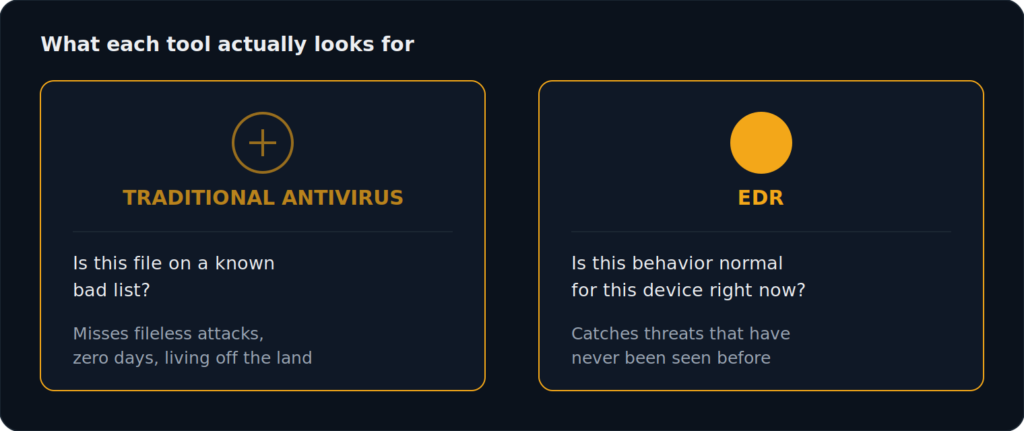
Antivirus is a guard checking IDs against a list of known troublemakers at the front door. EDR is a security team watching what happens inside the building after someone has already walked in, noticing when someone who works in accounting is suddenly trying to access the server room at 3 AM.
Both are useful. Neither replaces the other completely. But only one of them is actually built to catch an attacker who was never on any list in the first place.
Why Fileless Malware Slips Past Antivirus Completely
Fileless attacks never write a malicious file to disk. They execute entirely in memory, using scripts and legitimate system processes to carry out the attack. Since there is no file for antivirus to scan in the first place, signature based detection has nothing to compare against. The attack simply does not register as an event antivirus was designed to look for.
Living Off the Land: When Attackers Use Your Own Tools Against You
A related and increasingly common technique, often called living off the land, involves attackers using tools that are already installed on the system, PowerShell, Windows Management Instrumentation, the Windows Registry, rather than introducing anything new. Since these are legitimate, trusted tools that every business uses for normal operations, antivirus has no reason to flag them. EDR, by contrast, is watching how these tools are being used, not just whether they exist.
Why this matters
An attacker using PowerShell to encrypt your files looks identical to antivirus as an IT admin running a routine script. The file itself was never the problem. The behavior was.
The 82 Percent Problem: Why Most Modern Attacks Involve No Malware File at All
Recent industry breach data puts the share of detected attacks involving no traditional malware file at around 82 percent, driven almost entirely by fileless techniques and living off the land tactics. For a business relying solely on signature based antivirus, this means the vast majority of real world attack techniques are, by design, invisible to the tool meant to stop them.
Not sure what your current endpoint protection would actually catch?
Book a free security assessment and Ambsan’s team will show you the gap in plain terms.
What Happens After Antivirus Finds a Threat vs What EDR Does
When antivirus catches something, its job is essentially done. It quarantines or deletes the file, and maybe logs an entry. That is the extent of the response.
When EDR flags suspicious behavior, it can isolate the affected device from the network in seconds, stopping lateral movement before an attacker can reach other systems. It can terminate the malicious process, capture forensic detail about exactly what happened, and in many cases roll back file changes caused by ransomware before real damage sets in. Antivirus blocks and quarantines. EDR investigates, contains, and helps you understand what actually happened.
Ransomware Rollback: The Feature Antivirus Doesn’t Have
One of the most practical differences shows up after an attack has already started encrypting files. Some EDR platforms can detect the encryption behavior mid attack and automatically roll back the affected files to their pre encryption state, essentially undoing the damage in real time. Standard antivirus has no equivalent capability, because by the time it would recognize a threat through a signature match, the encryption may already be complete.
Why Free or Bundled Antivirus Is Especially Risky for Pakistani Offices
Many small and mid sized businesses in Pakistan are still running whatever antivirus came bundled with their operating system license, or a low cost yearly subscription chosen mainly on price. This is not a criticism of the businesses making that choice, it is often a reasonable decision when budgets are tight and nobody has explained what the tool is actually missing.
The risk is not that bundled antivirus is poorly made. The risk is that it was never designed to answer the question that actually matters against 2026 era ransomware, which is not “have we seen this file before” but “is something on this device behaving abnormally right now.”
EDR vs Antivirus Side by Side Comparison
| Factor | Traditional Antivirus | EDR |
|---|---|---|
| Detection method | Signature matching against known malware | Behavioral analysis of ongoing activity |
| Catches fileless attacks | No | Yes |
| Catches zero day threats | No, until a signature exists | Yes, based on behavior, not prior knowledge |
| Response when threat found | Quarantine or delete the file | Isolate device, terminate process, roll back damage |
| Visibility after an incident | Minimal, a log entry | Full forensic timeline of the attack |
Common Myth: “We Have Antivirus, So We’re Covered”
This is the single most common misconception Ambsan’s team encounters when reviewing a new client’s endpoint security setup. Having antivirus installed and having meaningful protection against 2026’s threat landscape are two different things. Antivirus remains useful as one layer, it still catches a large volume of common, unsophisticated malware efficiently. The mistake is treating it as sufficient on its own.
Do You Need to Replace Antivirus, or Add EDR
In most cases, the answer is not either or. Antivirus is fast, lightweight, and still effective against high volume, low sophistication threats, phishing attachments, common trojans, opportunistic malware. EDR adds the layer that catches what antivirus was never built to see. Many modern endpoint security platforms now combine both approaches into a single agent, so businesses do not have to choose one over the other.
Find out what your current setup would actually catch
Ambsan’s team reviews your endpoint protection and shows you exactly where the coverage gaps are, in plain, non technical terms.
Book a Free Security Assessment
What EDR Costs vs What a Ransomware Incident Costs
EDR is typically priced per endpoint on a monthly basis, a predictable, budgetable cost that scales with your team size. A single ransomware incident, by contrast, brings downtime, recovery costs, potential ransom demands, regulatory exposure, and reputational damage that can run into a very different order of magnitude entirely. The comparison is rarely close once a business has actually experienced one serious incident.
How Ambsan’s Endpoint Security Approach Works
Ambsan’s Endpoint Security solutions are built to defend every device against malware, ransomware, and unauthorized access, going beyond signature based scanning to give businesses real visibility into what is actually happening across their laptops, desktops, and servers. Rather than treating endpoint protection as a one time software install, Ambsan’s approach includes ongoing monitoring, so behavioral alerts are actually reviewed and acted on, not just generated and ignored.
This work sits alongside Ambsan’s broader security stack, including Next Generation Firewall and 24/7 SOC monitoring, so an endpoint alert can be correlated with what is happening across the rest of the network rather than reviewed in isolation.
Signs Your Business Has Outgrown Traditional Antivirus
- Your antivirus has never once generated an alert, despite years of use, which often means it is missing activity rather than confirming you are safe
- You have no visibility into what happens on an employee laptop beyond whether a scan found something
- Your business handles sensitive financial, medical, or customer data where a missed incident carries serious consequences
- You have remote or hybrid employees connecting from networks you do not control
- You could not answer, right now, how an attacker would move if one device got compromised today
What Happens After Deployment Matters More Than the Tool Itself
EDR generates alerts. Alerts only matter if someone is actually watching them and knows how to respond. A business that deploys EDR and never reviews its findings is not meaningfully better protected than one running plain antivirus, the tool is simply generating noise nobody hears. This is exactly why endpoint security works best as an ongoing, monitored service rather than a one time software purchase.
Talk to Ambsan before your next endpoint refresh
Get a clear picture of what your current antivirus is missing, and a practical path to closing the gap.
Frequently Asked Questions
Is EDR better than antivirus?
They serve different purposes rather than one being strictly better. Antivirus is fast and effective against known, common malware. EDR catches fileless attacks, zero day threats, and living off the land techniques that antivirus cannot see by design. Most modern security setups use both together.
Can EDR replace antivirus completely?
Many EDR platforms now include antivirus style signature detection as one layer within a broader behavioral monitoring system, effectively replacing standalone antivirus with a single combined agent rather than requiring two separate tools.
Why didn’t my antivirus detect the ransomware?
If the attack used fileless techniques or living off the land tactics, there was no malicious file for signature based antivirus to scan against. The attack behavior itself was the only signal, which is exactly what EDR is designed to catch and antivirus is not.
Is EDR expensive for a small or mid sized business?
EDR is typically priced per endpoint per month, a predictable cost that scales with team size. For most businesses this cost is significantly lower than the potential downtime, recovery, and reputational cost of a single serious ransomware incident.
What is a fileless attack?
A fileless attack executes entirely in a device’s memory using legitimate system tools, rather than installing a malicious file on disk. Because there is no file to scan, traditional signature based antivirus has nothing to detect.
Does EDR slow down employee laptops?
Modern EDR agents are built to run efficiently in the background with minimal performance impact, similar to standard antivirus software, though actual performance can vary by vendor and device specification.
How quickly can EDR stop a ransomware attack in progress?
EDR can isolate an affected device from the network within seconds of detecting suspicious behavior, and some platforms can automatically roll back file encryption if caught early enough in the attack, something standard antivirus cannot do.
Do I still need a firewall if I have EDR?
Yes. EDR protects individual devices, while a firewall protects the network perimeter. They address different layers of risk and work best as complementary parts of a broader security stack rather than substitutes for each other.
How do I know if my business needs EDR instead of just antivirus?
If your business handles sensitive data, has remote employees, has never seen your antivirus generate a real alert, or you cannot currently answer how an attacker would move after compromising one device, these are strong signs your business has outgrown antivirus alone.
Final Thoughts
Antivirus is not obsolete, and this is not an argument to rip it out. It is still a fast, efficient first layer against common, high volume threats. But treating it as complete protection against 2026’s ransomware landscape misunderstands what it was actually built to do. Antivirus checks files against a list. A large and growing share of real attacks were specifically designed to never appear on that list.
The businesses getting hurt are rarely the ones with no security tools at all. They are the ones with a false sense of coverage, a clean antivirus dashboard that was never going to see the attack coming in the first place.
Related: Third Party Vendor Risk, How One Breach Sinks a Business
Ready to see what your current antivirus is missing?
Book a free, no obligation consultation with Ambsan’s security team and get a clear endpoint security plan.
Ambsan Technologies is a Karachi based cybersecurity firm serving businesses across Pakistan and the United States, offering endpoint security, network security, and managed IT services for SMEs and enterprises.