
Ransomware does not usually break in through a genius hack. It walks through the door you left open. Here is how to shut it, one practical step at a time.
A Karachi based textile exporter opens a routine invoice email on a Monday morning. By lunch, every file on the shared drive is locked, and a note on the desktop is demanding payment in Bitcoin. This is not a rare story anymore.
Ransomware attacks against Pakistani businesses have been climbing steadily. Kaspersky detected ransomware activity in Pakistan roughly 42,000 times in the first three quarters of 2025 alone, and small and mid sized businesses are increasingly the preferred target, not because they hold the most valuable data, but because they usually have the thinnest defenses.
The good news is that most ransomware attacks are preventable. Attackers look for the easy way in, not the hard one. Close the common gaps and your business stops looking like an easy target.
Below are 12 practical steps you can start today, ordered from the fastest wins to the ones that take a bit more planning.
Why Ransomware Is a Growing Threat for Pakistani SMEs
Ransomware groups have industrialized. Data leak sites tracked by security researchers listed more than 7,500 victim organizations worldwide in 2025, up 58 percent from the year before, and small businesses made up a growing share of that list. Attackers now move faster too. The median time between breaking in and locking your files has dropped to around 5 days in recent reporting, down from over a week previously.
For a Pakistani SME, this shift matters. Many small and mid sized businesses run lean IT teams, use a mix of personal and work devices, and rely on outdated software because replacing it feels expensive. Attackers know this. At Ambsan, our security team sees the same entry points again and again across industries, from textile exporters to fintech startups, and almost all of them are fixable without a large budget.
Tip 1: Back Up Your Data the Right Way
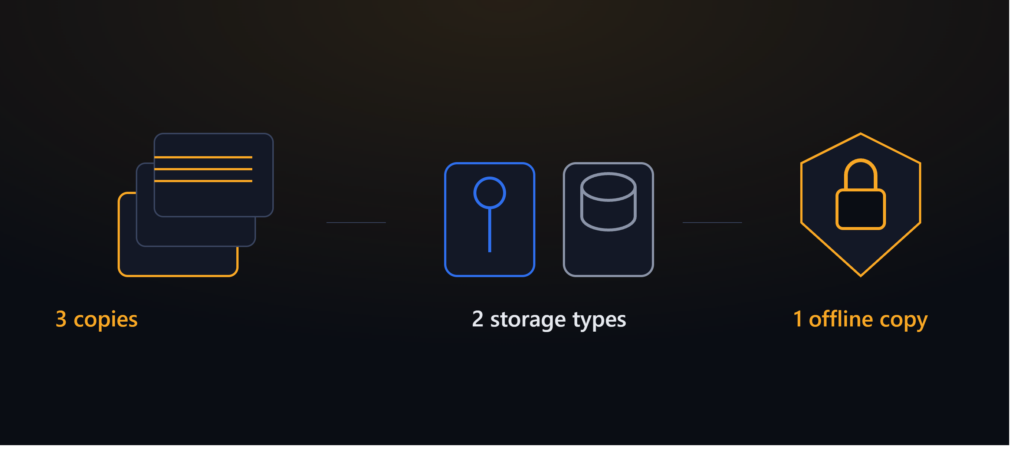
01 Follow the 3 2 1 rule
Keep 3 copies of your data, on 2 different types of storage, with 1 copy stored offline or off site. If ransomware encrypts your live files, an offline backup is the difference between a bad afternoon and a business ending event. Cloud backups alone are not enough if the ransomware can reach them through a synced drive.
Tip 2: Patch and Update Everything, Not Just Windows
02 Close the gaps attackers already know about
Most ransomware does not use a secret zero day exploit. It uses a known vulnerability that was never patched. Firewalls, VPN appliances, and edge devices have overtaken stolen passwords as the leading way attackers get in, largely because these devices sit exposed to the internet and get updated less often than laptops. Set a monthly patch schedule and stick to it.
Tip 3: Turn On Multi Factor Authentication Everywhere
03 One password should never be enough
Email, remote access tools, cloud storage, and admin panels should all require a second factor. A stolen or guessed password is the fastest entry point into a small business network, and MFA is one of the cheapest controls available to stop it cold.
Tip 4: Train Your Team to Spot Phishing Emails
04 Your employees are your first firewall
Phishing remains the most common way ransomware enters a small business, often through a fake invoice, a fake courier notice, or a message that looks like it came from a vendor. A short quarterly training session, combined with a simulated phishing test, does more to reduce risk than most software purchases.
Tip 5: Segment Your Network
05 Do not let one infected laptop reach everything
If your finance system, factory floor devices, and guest Wi-Fi all sit on the same flat network, one infected device can spread ransomware across your entire business in minutes. Segmenting critical systems into separate zones slows attackers down and buys your team time to respond.
Tip 6: Limit Admin Access
06 Not everyone needs the keys to everything
Give people the access they need for their job, nothing more. Ransomware that lands on an account with admin rights can spread across shared drives and systems far faster than one with standard user permissions. Review admin accounts every quarter and remove the ones nobody remembers creating.
Tip 7: Secure Your Remote Access and VPN
07 Remote work should not mean an open door
VPN and remote desktop tools are now among the top entry points for ransomware groups because they are often internet facing and under patched. Restrict remote access to what is necessary, require MFA on every remote login, and retire any remote access tool your team no longer actively uses.
Quick gut check
If you cannot answer “when was our last successful backup test” or “who currently has admin rights on our systems” without checking, tips 1 and 6 above are worth doing this week, not next quarter.
Tip 8: Monitor for Unusual Activity Around the Clock
08 Detection buys you the time prevention alone cannot
Attackers increasingly sit inside a network for days before deploying ransomware, quietly mapping out backups and file shares. Around the clock monitoring, whether through an in house SOC or a managed provider like Ambsan’s 24/7 SOC, is often what catches an intrusion before it turns into an encryption event.
Tip 9: Have an Incident Response Plan Before You Need One

09 Decide the hard questions while you are calm
Who do you call first. Which systems get isolated. Who is authorized to make the call on paying or not paying a ransom. Writing these answers down in advance turns a chaotic morning into a rehearsed process, and it consistently shortens recovery time.
Tip 10: Test Your Backups, Don’t Just Make Them
10 An untested backup is a guess, not a plan
Plenty of businesses discover their backup was corrupted, incomplete, or months out of date only after ransomware hits. Schedule a real restore test at least twice a year, not just a check that the backup job “ran successfully.”
Tip 11: Vet Your Vendors and Third Party Access
11 Their weak password can become your breach
If a vendor, freelancer, or software integration has access to your systems, their security posture becomes part of yours. Ask vendors basic questions about how they protect the access they hold, and remove accounts for anyone who no longer needs them.
Tip 12: Get a Professional Security Assessment
12 You cannot fix what you cannot see
A structured assessment maps out exactly where your business is exposed, from unpatched systems to weak backup practices, and ranks the fixes by risk and cost. Most SMEs are surprised by how many of the gaps found are quick, low cost fixes rather than expensive overhauls.
Not sure where your business actually stands?
Ambsan’s security team can walk through your current setup and flag the highest risk gaps in a single session.
Book a Free Security Assessment
Common Mistakes Pakistani SMEs Make With Ransomware Defense
| Common approach | Why it falls short |
|---|---|
| “We have antivirus, so we are covered” | Antivirus catches known malware signatures. It rarely stops credential based access or living off the land techniques attackers now favor. |
| Backups stored on the same network | If backups are reachable from an infected device, ransomware can encrypt or delete them too. |
| One time security training at onboarding | Phishing tactics evolve constantly. A single session years ago will not catch today’s tactics. |
| No documented response plan | Decisions made under pressure, without a plan, tend to be slower and more expensive. |
What to Do in the First Hour If You’re Hit
Disconnect the affected devices from the network immediately, but do not power them off, since forensic evidence can be lost. Notify your incident response contact or provider right away. Avoid restarting systems or running removal tools before your response team has assessed the scope. Do not contact the attacker without guidance, and do not assume paying guarantees you get your data back.
How Ambsan responds
Ambsan’s incident response process starts with containment within the first hour of engagement, followed by a forensic assessment to identify the entry point, then a recovery plan built around your verified backups rather than a ransom negotiation.
How Ambsan Technologies Helps Pakistani SMEs Stay Protected
Ambsan works with businesses across Pakistan, from Karachi and Lahore to Islamabad, and with clients in the United States through our Huntington Beach office, to build ransomware defenses that fit an SME budget without cutting corners on protection.
24/7 SOC monitoring

Round the clock detection and incident response, not just alerts nobody reads.
ISO 27001 aligned audits
Structured assessments that map real gaps, not generic checklists.
Proven track record
Supporting businesses from local SMEs to large enterprises across sectors.
Dual market presence
Local context in Pakistan, with international compliance experience for cross border clients.
Frequently Asked Questions
What is ransomware and how does it spread?
Ransomware is malicious software that encrypts a victim’s files and demands payment, usually in cryptocurrency, for the decryption key. It commonly spreads through phishing emails, compromised remote access tools, and unpatched software vulnerabilities.
Can antivirus alone stop ransomware?
No. Antivirus catches known malware signatures, but modern ransomware attacks often start with stolen credentials or exploited vulnerabilities rather than a detectable file. Layered defenses, including monitoring and backups, are needed.
Should a business pay the ransom?
Most security experts and law enforcement agencies advise against paying, since it does not guarantee data recovery and encourages further attacks. A growing majority of organizations globally now refuse to pay. The decision should involve legal counsel and an incident response professional.
How much does ransomware recovery cost in Pakistan?
Costs vary widely based on business size, downtime, and whether backups are intact. Beyond any ransom demand, expect costs from lost revenue during downtime, forensic investigation, system rebuilding, and reputational impact with clients.
How long does it take to recover from a ransomware attack?
Recovery time depends heavily on backup quality and preparation. Businesses with tested, offline backups and a documented response plan often recover in days. Those without can face weeks of disruption.
What is the 3 2 1 backup rule?
It means keeping 3 copies of your data, on 2 different storage types, with 1 copy stored offline or off site. This ensures at least one backup stays out of reach if ransomware spreads through your network.
How often should employees be trained on phishing?
A quarterly cadence works well for most SMEs, combined with occasional simulated phishing tests. Attack tactics change quickly, so a single onboarding session is not enough on its own.
Can small businesses really afford strong ransomware protection?
Yes. Many of the most effective controls, like MFA, backup testing, and access reviews, cost little beyond staff time. A professional assessment can help prioritize spending toward the highest risk gaps first.
Is ransomware really a bigger risk for SMEs than large enterprises?
Attackers increasingly target small and mid sized businesses because they tend to have weaker defenses, even though large enterprises hold more valuable data. Volume based attacks now make SMEs frequent targets.
What is the first thing to do if hit by ransomware?
Disconnect affected devices from the network without powering them off, and contact your incident response provider immediately. Avoid running removal tools or restarting systems before a professional has assessed the situation.
Final Thoughts
Ransomware defense is not one big project. It is 12 smaller habits, backups that actually work, patched systems, trained staff, limited access, and monitoring that catches problems early. Start with the ones you have been putting off longest.
For more on this topic, read our guides on
Ransomware Defense: How to Detect, Isolate and Recover Fast
Ready to close the gaps before an attacker finds them?
Get a free risk assessment from Ambsan’s security team and see exactly where your business stands.
Ambsan Technologies. Cybersecurity services across Pakistan and the United States.